MeDo

Meet the Team, Without the Stock Photos.

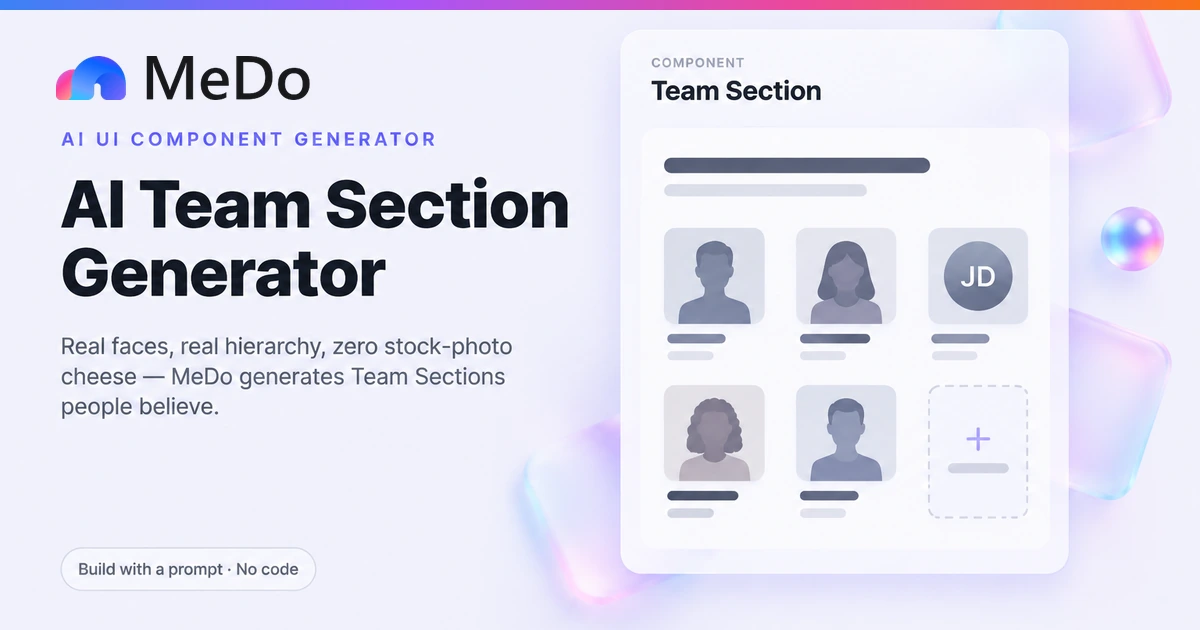
List your people and MeDo generates a team section — a grid of member cards with real photo slots, honest initials fallbacks, role clarity, and the variants most generators skip: founder-first ordering for small teams, a one-person "team of one" layout, and a hiring CTA for teams that are growing.

Team Section
Team Section

A Team Section Is a Trust Instrument, and Stock Photography Is Forged Currency

Visitors do not read a team section to learn names — they read it to answer a question about risk: who is actually behind this, will they still exist next year, and can I put a face to the person who will answer my support ticket. Every design decision either serves that investigation or sabotages it. Stock photos sabotage it instantly and completely: the same three models appear on hundreds of SaaS sites, and one recognized stock face poisons the credibility of every genuine element around it. Real, slightly imperfect photos do the opposite work — they signal that the company spent effort on honesty rather than polish. When photos genuinely cannot be shared, initials on a flat color circle are the honest fallback, and a consistent initials system reads as deliberate rather than evasive. Ordering carries meaning too: a two-person company displaying a founders-first grid is more credible than one displaying seven identical anonymous cards, and a "team of one" that says so plainly converts better than a solo founder pretending to be a department. The section ends where the company's growth story points: either a hiring card for teams that are growing, or nothing at all for teams that are not.

템플릿 4개

생성할 수 있는 Team Section 템플릿

모든 템플릿은 스크린샷이 아니라 실제 프롬프트입니다. 어떤 AI 에디터에든 붙여넣거나 MeDo에서 실행해 React + Tailwind 코드를 그대로 받으세요.

StartupFounders First

Founder-Led Team Grid

Founders occupy the first row at full card size, the rest of the team follows. The right structure under about twenty people, when the individuals are the pitch.

Create a team section for a 7-person startup about page, ordered founders first: two founders in the opening row, then five team members in rows beneath, grouped loosely by function. Each card: a 1:1 photo with rounded-xl corners and a 1px zinc-200 ring, name in 16px semibold zinc-900, role in 14px zinc-500 — one plain role per person, no compound titles. Two 32px circular icon buttons (LinkedIn, X) beneath the role, full opacity on hover and always visible on touch. Members without a photo URL render their initials in white on a zinc-800 circle of the same dimensions, never clip art. Photos sit in figures with alt text "{name}, {role} at {company}". Grid: 3 columns desktop, 2 tablet, 1 mobile, 32px gaps. Close the section with a hiring card the size of one grid cell: "We're hiring" plus open roles and a link to /careers.

MeDo에서 시도하기
IndieTeam of One

Solo Founder Card

One centered member card with a first-person bio that makes the company size the selling point. Honesty about scale converts better than fake departments.

Create a team-of-one section for an indie product's about page: a single centered card, max-width 420px, containing a 160px circular photo, the maker's name in 20px semibold, the line "Founder, engineer, and support desk" in 15px zinc-500, and a 4-5 sentence first-person bio explaining why the product is built and run solo — framing it as faster support and a coherent vision rather than apologizing for size. Below the bio, two quiet social links and a text link to the product changelog. Surround the card with generous whitespace (96px vertical padding) and place a short section header above it: the product name followed by "is built and maintained by one person." No grid, no hiring card, no fake team — the solitude is the message. Add a subtle zinc-100 ring around the photo and keep the whole section under 600px tall on mobile.

MeDo에서 시도하기
CareersHiring Grid

Team Grid With Hiring Card

The member grid doubles as recruiting: the final cell is a hiring card with open roles and culture in one sentence, so the section works on the careers page too.

Create a team section that ends in recruitment. Render eleven member cards in a 4-column grid, then a twelfth cell styled as a hiring card: dashed 1px zinc-300 border, centered content reading "Your name here" in 16px semibold above "We're hiring 2 backend engineers and 1 designer" in 14px zinc-500, with a solid indigo "See open roles" button linking to /careers. The hiring card must match member-card dimensions exactly so it reads as part of the grid, and its dashed border distinguishes invitation from roster. Keep member cards minimal: 1:1 photo, name, role, no social links — this page is for candidates, not verification. Add one 13px zinc-500 line under the grid: "We publish salaries in every posting." Responsive: 4 columns desktop, 2 tablet, 1 mobile, 24px gaps.

MeDo에서 시도하기
ScaleEnterprise Directory

Function-Grouped Leadership Grid

For larger companies: quiet functional group labels, no social links, leadership row first. Built for the "who owns this?" lookup, not the culture tour.

Create a team section for an enterprise about page, organized as three labeled groups: Leadership (5 people in a full-size row), Engineering (8), and Go-to-Market (8). Each group has a 13px uppercase tracking-wide zinc-400 label above a 4-column grid of compact cards: 96px 1:1 photo with rounded-lg corners, name in 15px semibold, role in 13px zinc-500, no social links and no hover effects — the section is a lookup tool, not a showcase. Leadership cards are slightly larger than the rest to carry a whisper of hierarchy without a separate layout. Initials fallback on zinc-100 circles for anyone without a photo. Desktop shows all groups in sequence; mobile collapses to 2 columns with group labels as sticky-free section breaks. Use tabular alignment so rows stay even across groups, and keep total vertical height under three screens.

MeDo에서 시도하기

Team Section 커스터마이즈 방법

Use real photos or honest initials — never stock

Designate explicit photo slots with descriptive alt text, and ask for an initials fallback rendered on a flat circle for members without photos. The one unforgivable option is stock photography: visitors recognize it, and one fake face devalues every real one next to it.

Let the ordering tell the org story

Founders first is right for a company under about twenty people, where the individuals are the value proposition. At scale, group by function — engineering, design, go-to-market — with quiet group labels. Say which stage you are; the two orderings produce structurally different grids.

One role per person, written like a human

"Co-founder & CEO" is fine; "Chief Visionary Officer of Strategic Synergy" empties the section of meaning. Ask for a single plain-language role per card and resist compound titles — the reader is assessing competence, and vagueness reads as hiding something.

Match the ending to your stage

Growing teams should close the section with a hiring card in grid-cell form: open roles, a link, one sentence of culture. Stable teams should end cleanly on the last member — a hiring CTA on a team that is not hiring is the same false note as a stock photo.

Team Section 컴포넌트를 사용하는 사람

Startup about page

A founders-first grid of the whole company with hover social links and a hiring card closing the section — the canonical use, where the individuals are the product's credibility.

SaaS landing page founders strip

Just the two or three founders in a compact row under the story block, answering "who built this?" on the landing page itself for visitors who never reach the about page.

Indie product team-of-one page

A single centered member card with a first-person bio and a photo of the maker, stating plainly "built and maintained by one person" — which is a selling point, not a confession.

Agency careers page

A function-grouped grid of twenty-plus people with role labels, doubling as a culture preview for candidates arriving from the hiring card or a job listing.

웹사이트 유형별 Team Section 패턴

같은 team section 컴포넌트를 게시되는 사이트 유형에 맞춰 조정합니다.

01 / 04

Startup About Pages

The full company grid, founders first, with social links and a hiring card. This is the page a prospect visits at the "do I trust these people" stage — real photos and plain roles are doing conversion work here.

Team Section 스타일과 변형

페이지의 나머지 부분과 어울리는 변형을 골라 바로 생성하세요.

01 / 04

Photo-Forward Grid

Large 1:1 photos with rounded corners and a hairline ring, minimal text beneath. The strongest-trust option, and the one that punishes stock photography hardest — it only works with real faces.

React, Next.js, Vue, Svelte에서의 Team Section

React, Next.js, Vue 3, SvelteKit, Astro 또는 순수 HTML — 같은 team section을 여섯 가지 방식으로 넣을 수 있습니다.

01 / 03

React Team Section

Members are one typed array; the initials fallback is a two-line conditional. Founder-first ordering is just array order — the grid renders whatever sequence you hand it.

src/components/TeamSection.tsx

type Member = { name: string; role: string; photo?: string }

const members: Member[] = [
  { name: 'Ada Chen', role: 'Co-founder & CEO', photo: '/team/ada.jpg' },
  { name: 'Sam Ortiz', role: 'Engineer' }, // no photo -> initials
]

function Card({ m }: { m: Member }) {
  return (
    <figure className="text-center">
      {m.photo ? (
        <img src={m.photo} alt={`${m.name}, ${m.role}`}
             className="aspect-square w-full rounded-xl ring-1 ring-zinc-200" />
      ) : (
        <div className="grid aspect-square w-full place-items-center rounded-xl
                        bg-zinc-100 text-2xl font-semibold text-zinc-700">
          {m.name.split(' ').map((p) => p[0]).join('')}
        </div>
      )}
      <figcaption className="mt-3">
        <p className="font-semibold">{m.name}</p>
        <p className="text-sm text-zinc-500">{m.role}</p>
      </figcaption>
    </figure>
  )
}

Team Section을 프로젝트에 추가하는 방법

team section 템플릿을 고르고 프로덕션에 배포하기까지 네 단계.

01~1-2 days (waiting on people, not coding)

Collect Real Photos and Plain Roles

Chase down genuine photos — even phone-quality ones — and write one human-readable role per person. This step decides the section's credibility before any code exists; no layout can rescue a grid of stock faces and inflated titles.

02~10min

Choose Ordering and Ending

Decide founders-first versus function-grouped based on company size, and whether the section ends in a hiring card or stops at the last member. Both choices change the generated structure, so make them before prompting.

03~2min

Generate in MeDo

List each person as name, role, and photo URL — or "initials" where photos are missing — and name the page and the ending you want. MeDo generates the grid as React + Tailwind with alt text and responsive columns built in.

04~10min

Review at Every Breakpoint and Ship

Check the grid at mobile, tablet, and desktop widths: photos square and uncropped, initials circles matching photo dimensions, social links reachable without hover on touch. Fix anything in plain English, then publish.

Team Section에 대한 자주 묻는 질문

What if my team will not share photos?

Use initials on a flat zinc-100 circle, consistently across every member who opts out — consistency is what makes it read as a design system rather than evasion. Ask MeDo for the initials fallback as a first-class variant, with each person's circle taking a muted tint from a small palette so the grid does not go monotone. The pattern to avoid is mixing one or two real photos with clip-art avatars for everyone else; the contrast advertises exactly who declined.

Should founders come first in the team grid?

Below roughly twenty people, yes — the individuals are the value proposition, and a founder-first row tells the visitor whose judgment they are buying. Past that size, founder-first ordering starts to read as hierarchy theater, and grouping by function with quiet labels serves the reader better, since they are usually looking for "who does X" rather than "who is in charge". Decide by stage and say it in the prompt; the two orderings produce different grid structures, not just different sort orders.

How do I present a team of one without looking amateur?

Say it plainly and make it an asset. A single centered card with a real photo, a first-person bio, and a line like "designed, built, and supported by one person" reframes scale as focus: one person means fast support and a coherent product. What kills credibility is the opposite — a solo founder padding the section with stock colleagues, advisors given member-card prominence, or a pet presented as head of morale. Visitors respect honesty about size far more than they respect size.

Where should the team section live — about page or landing page?

The full grid belongs on the about page, where visitors have opted into the people story. On the landing page, use a founders strip: two or three cards under the narrative block, often linked to the full grid. Landing-page visitors are evaluating the product; the founders answer "who is behind this?" in one glance, while a twelve-card grid steals scroll depth from features and pricing. MeDo can generate both from the same member data if you ask.

Should team member cards link to social profiles?

For founders and customer-facing roles, yes — a LinkedIn link is itself a trust signal, because it invites verification. Keep them to one or two quiet icon buttons per card that reach full opacity on hover but stay visible on touch, where hover does not exist. For a large function-grouped grid, drop social links entirely: at that scale they add noise, and nobody verifying an enterprise vendor clicks through to a support engineer's profile.

How do I generate a team section with AI?

List each person with name, one plain role, and a photo URL or the word "initials", then state the ordering you want — founders first or grouped by function — and the page it sits on. Mention whether you want a hiring card at the end and where it should link. MeDo generates the grid as React + Tailwind with alt text, initials fallbacks, and responsive columns included; refine afterward in plain English, like "make the photos square with softer corners" or "swap the hiring card for a newsletter link".