MeDo

AI Post Collection Generator.

A blog index, a category archive, and a tag page are one pattern wearing different arrangements. Describe your corpus and MeDo generates the whole collection — featured placement, card or list density, URL-driven filtering, pagination, and the loading and empty states in between.

Post Collection
P

Every Content Surface Is the Same Four Decisions

Any page whose job is 'here are our posts' makes the same decisions in the same order: what deserves the featured slot, how densely the rest render, how readers narrow the set, and how they move through it. Treat those as one pattern and every surface — blog index, category archive, tag page, author archive — becomes a configuration of a machine you already trust, instead of a fresh design each time. The decisions interact, which is why one-off builds keep going wrong: a dense list leaves no room for a featured card, component-only filters make every narrowed view unlinkable, load-more fights the browser back button. Deciding them once, as a pattern with an explicit state flow — filter state in the URL, page state in the route, loading and empty states accounted for — means the changelog, the resources hub, and the blog behave identically, and readers learn the navigation once for all of them.

4 Vorlagen

Post Collection-Vorlagen, die Sie generieren können

Jede Vorlage ist ein echter Prompt, kein Screenshot. Kopieren Sie ihn in einen KI-Editor oder führen Sie ihn in MeDo aus und erhalten Sie React- und Tailwind-Code zurück.

Featured + gridMagazine Front

Hero Post Above a Card Grid

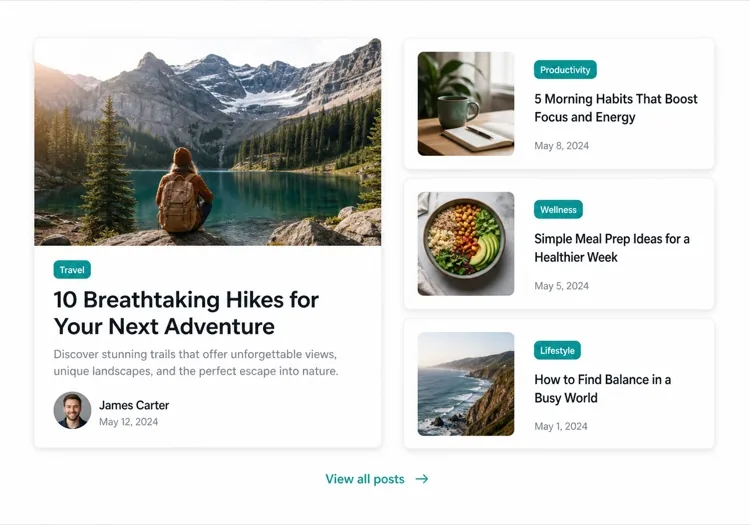
The canonical blog index: one wide featured card announcing the corpus, then the grid. Right when covers exist for every post and browsing is the point.

Create a blog index with a magazine arrangement: a collection header with title and one-line description, then a featured region rendering the newest cornerstone post as a wide card — 16:9 cover, category tag, title, two-line excerpt, author and date — followed by a 3-column grid of nine standard cards with 4:3 covers, titles, and dates. The grid collapses to 2 columns on tablet and 1 on mobile with 24px gaps. Close with numbered pagination built from real links: previous, page numbers with the current page filled, next. Render six skeleton cards while data loads, matching the final dimensions so nothing shifts on arrival.
In MeDo testen
UtilityDense Archive

Month-Grouped Chronological List

Changelogs and release notes: rows, dates, no images, sticky month headings. The arrangement that respects a reader who came to scan, not to browse.

Create a changelog-style post collection optimized for scanning: a slim header with the total post count and a year selector, then a single-column list of rows — publish date in tabular figures on the left, title as the only link, a one-line summary clamped to a single line, and no cover images anywhere. Group rows under sticky month headings that remain visible while scrolling. Separate rows with 1px zinc-200 hairlines and 16px vertical padding, darkening the title on hover. Close with numbered pagination in the footer. On mobile, move the date above the title and drop the summary entirely rather than letting it wrap.

In MeDo testen
URL-drivenFilterable Hub

Category Pills Over a Live Grid

When narrowing is the main activity: pills that write to the URL, a grid that answers instantly, and an honest count. The resource-library arrangement.

Create a resource hub where filtering is the point: a header row with a search input and category pills — All, Guides, Videos, Templates — where the active pill fills indigo and each selection writes ?category= to the URL with history.replaceState so views are shareable. Below, a 3-column card grid where every card keeps its type badge, cover, title, and length-or-duration meta. Refilter with a 150ms fade, show a results count that updates with the selection, and render an empty state quoting the active filter with a Clear-filter action when a type has no matches. On load, read the filter back from the URL so a shared link restores the exact view.

In MeDo testen
Load moreMinimal Feed

Single Column With Progressive Loading

Personal-blog mode: one column, typography carrying the design, load-more appending pages while the URL keeps position. Proof the pattern survives subtraction.

Create a personal-blog feed: a single centered column 640px wide of compact post rows — date, title in 20px semibold, one-line excerpt — separated by hairline dividers, no images, no sidebar. Below the fold, a Load-more button that appends the next ten posts from a paginated source and updates ?page= in the URL so a refresh restores position. While fetching, show a subtle inline spinner in place of the button; when the corpus is exhausted, replace it with 'You have reached the beginning' in zinc-400. Keep the first ten posts server-rendered so the page is crawlable before any JavaScript runs.

In MeDo testen

So passen Sie Ihre Post Collection an

Match density to the reader's mode

Browsing and brand moments justify cover images and a grid; utility scanning — changelogs, release notes, archives — wants a dense list where dates do the sorting. Say which mode your reader is in when they arrive; the arrangement follows from that answer, not from what looks most impressive in a screenshot.

Put filter state in the URL

A category filter that lives only in component state cannot be linked, shared, or recovered with the back button, and search engines see none of it. Generate filters as real URL parameters so every narrowed view is an addressable page with its own title — that is the difference between a filter and a set of archives.

Paginate numbered links for content, save load-more for feeds

Numbered pagination gives every page a crawlable URL and a predictable back button, which is what you want when posts are the destination. Load-more suits feed-shaped browsing where sessions are long and nobody deep-links to item forty. Pick per surface and say which one you want — the state model differs.

Feature on purpose, not by recency

The featured slot is the loudest element on the page, so give it a rule you can defend: cornerstone guides, the post that answers your top search query, a launch. Newest-post-by-default is a non-decision that lets a minor changelog entry outrank the guide that pays the bills.

Wer die Post Collection-Komponente nutzt

Company blog homepage

One featured launch announcement above a three-column grid, with category pills driving URL-based archives — the canonical arrangement, and the one readers already know how to operate.

Changelog and release archive

A dense reverse-chronological list grouped by month, no cover images, numbered pagination — utility scanning where dates and titles are the only metadata that matters.

Resource library

A mixed corpus of guides, videos, and templates behind a type filter and search, each type keeping its own card anatomy inside one shared grid.

Author and tag archives

The pattern at its most minimal: a count header — '14 posts tagged pricing' — above a plain list, proving the arrangement degrades gracefully when there is nothing to feature.

Post Collection-Muster für verschiedene Websites

Dieselbe post collection-Komponente, abgestimmt auf die Art der Website, auf der sie läuft.

01 / 04

Company Blog Indexes

The full arrangement: featured region, category pills writing real URLs, grid, numbered pagination. Readers learn it once and every archive on the site inherits the muscle memory.

Post Collection-Stile und -Varianten

Wählen Sie die Variante, die zum Rest der Seite passt, und generieren Sie sie.

01 / 04

Cover-Image Card Grid

The magazine look: image-led cards in even columns. Highest visual appeal, highest asset cost — every post needs a cover, and the grid falls apart when three are missing.

Post Collection in React, Next.js, Vue und Svelte

React, Next.js, Vue 3, SvelteKit, Astro oder reines HTML — dieselbe post collection, sechs Wege zur Einbindung.

01 / 03

React Post Collection

The region scaffold with its state flow: filter and page live in URL-synced state, filtering resets the page, and each region renders from the same derived list.

src/components/PostCollection.tsx

const [category, setCategory] = useState('all')
const [page, setPage] = useState(1)

const filtered = posts.filter(
  (p) => category === 'all' || p.category === category,
)
const visible = filtered.slice((page - 1) * 9, page * 9)

return (
  <>
    <CollectionHeader count={filtered.length} />
    <FilterPills value={category}
      onChange={(c) => { setCategory(c); setPage(1) }} />
    {page === 1 && category === 'all' && <FeaturedCard post={filtered[0]} />}
    <PostGrid posts={visible} />
    <Pagination page={page} total={filtered.length} onPage={setPage} />
  </>
)

So fügen Sie Ihre Post Collection einem Projekt hinzu

Vier Schritte, von der Auswahl einer post collection-Vorlage bis zum Einsatz in der Produktion.

01~15min

Inventory the Corpus

Count the posts, check which have covers, and name the categories. Three posts do not need a filter bar; three hundred do not fit one grid. The corpus decides the arrangement before you write a word of prompt.

02~10min

Fix the State Model

Decide where filter and page state live — URL parameters for anything a reader might link, component state only for ephemeral convenience. This is the one decision that is expensive to change after generation.

03~2min

Generate the Collection

Paste a real post object, name the arrangement, and list the states you want — loading skeletons, empty filter results, exhausted feed. MeDo builds every region in one pass.

04~5min

Exercise the States

Click every pill, walk to the last page, force an empty filter, press back after narrowing. The happy path of a collection is boring; its reputation lives in these four states.

Häufige Fragen zu Post Collection

How is a post collection different from a blog section?

A blog section is one static strip on a marketing page — a featured card, three recent posts, a view-all link. A post collection is the organizing pattern for surfaces where posts are the page: the blog index, category and tag archives, author pages. It carries everything a strip never needs — filtering state, pagination, density choices, loading and empty states. Use the section to tease content from a landing page; use the pattern to build the destination it links to. The seam matters: the section's view-all link should land on a collection, and the two should feel like one design system.

Should I use pagination or infinite scroll?

For content people arrive at from search and share, numbered pagination: every page has a URL crawlers can index and the back button behaves. Infinite scroll fits feed-shaped browsing where the session is the unit and nobody links to item forty. The middle path is a load-more button that updates the page parameter in the URL, preserving shareable position without a full page turn. Decide per surface, and tell MeDo which one — the state model is different from the first line of code.

How many featured posts should a collection have?

One wide featured card is the strong default: two competing heroes cancel each other and readers skip both. If you want to showcase a set, make it a separate labeled region — 'Editor's picks' as three compact cards — rather than inflating the hero. The featured slot earns its size by being an unambiguous answer to 'start here'.

Does client-side filtering hurt my blog's SEO?

Filtering itself is a UI behavior search engines ignore — the risk is what it replaces. If the only way to reach your Backend archive is clicking a pill, that archive has no URL, no title, and no presence in search results. Generate filters as real parameter URLs with distinct titles and keep the unfiltered index crawlable; filtering then stays a browsing convenience while the archives do the ranking work.

What data does each post in the collection need?

The contract every card renders from: title, href, publish date, excerpt, cover image with declared dimensions, and a category or tags. Fields also need display rules — a two-line excerpt clamp, a fixed aspect ratio on covers — or one long title will shove an entire grid out of alignment. Paste a real post object into your MeDo prompt and the generated code respects those constraints instead of inventing its own.